Features · Content Checking

Paste the draft, get a verdict and publish with confidence

Anyone in your company can check in seconds whether what they're about to publish on LinkedIn fits the company's communication framework. They sign in with their work email, with no passwords and nothing to install.

A professional checking a LinkedIn post with Scoringmy's compliance traffic light
A verdict in seconds No passwords Unlimited checks No text is stored Nothing to install SSO on request
How it works

From a PDF nobody reads to a tool that checks in seconds

Four steps. We do the first one with you in a single session. The other three run on their own.

01

Define the framework

A 90-minute session to set the company's communication territories and red lines. We arrive with a pre-built proposal for your sector; you adjust it.

02

Give the whole workforce access

Any professional signs in with their work email and gets a private link. No passwords, no sign-ups and no administration on your side.

03

Check before publishing

Paste the draft, or upload the image that goes with it, and get a traffic light with a specific recommendation. In seconds, from a phone or a laptop.

04

Communications sees the aggregate

A panel with the volume of checks, recurring themes and activity by area. Always aggregated, never individual behaviour.

The traffic light

Three possible answers. None of them blocks anything.

The professional pastes their draft and gets a verdict written to help them, not to correct them. The decision to publish is always theirs.

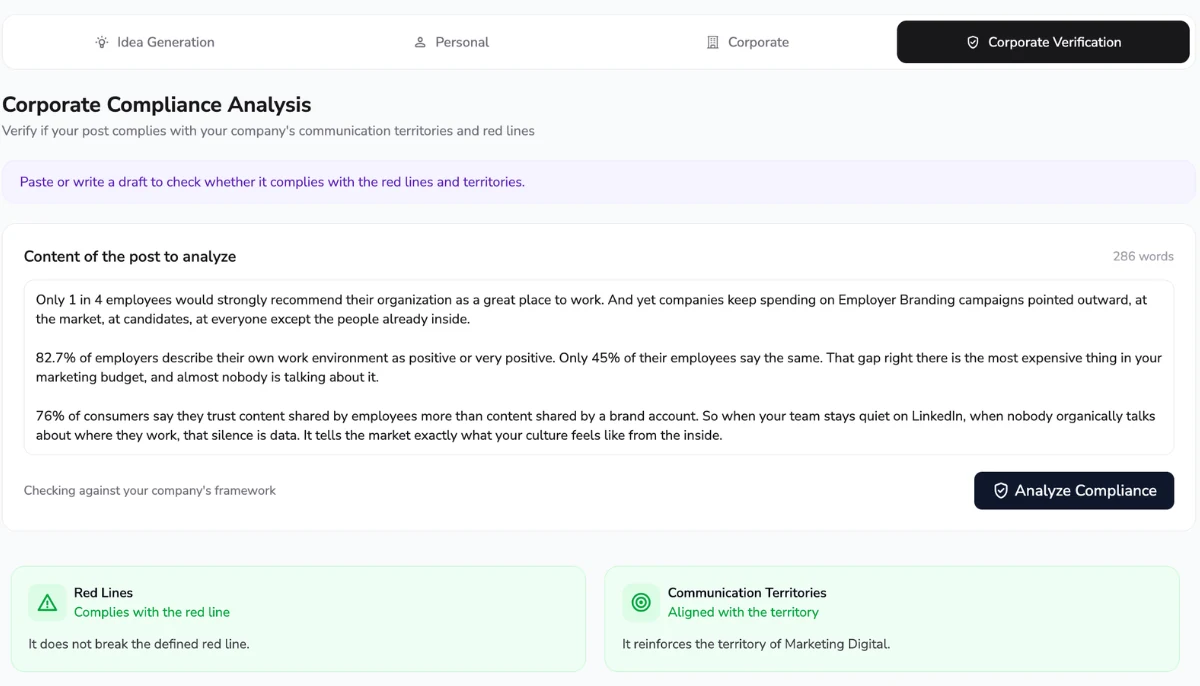
Scoringmy corporate compliance analysis screen showing communication territories and red lines

One text box and a verdict

No forms, no categories to pick, no manual. The professional pastes what they were about to publish and gets an immediate answer on two axes: the company's red lines and its communication territories.

  • An answer in seconds. About as long as it takes to read the post.
  • Two axes. Compliance with red lines and alignment with the territories.
  • A specific recommendation. Exactly what to review, not a generic warning.
  • Nothing is kept. The text is processed and discarded.

Green

Publish without any issue. The content sits inside the framework.

Example responseAll good. You can publish this as it is. It also talks about one of the subjects your company wants to push.

Amber

There is something worth reviewing before you publish, and the tool tells you exactly what.

Example responseOne thing to watch: you've said when you're delivering a project to a client. That date is internal. Take it out and the rest is fine to publish.

Red

Better to check with Communications first. It is still a recommendation: nobody blocks the post.

Example responseBetter to talk to Communications first. The subject you are touching on is one your company prefers to cover through its official channels. They can help you find another angle.
The professional never sees the rules. Only the verdict.

The full framework — territories and red lines — is visible to the administrator alone. The professional gets the recommendation, not the rulebook. We treat this as a confidentiality guarantee: a company's communication framework is sensitive information and has no reason to circulate.

New

And now the image that goes with the post

A post is not only text. A team photo can have a whiteboard with client names behind it, a monitor showing figures, a badge hanging from someone's neck or a document left on the table. Nobody looks twice when taking the picture. Now the professional uploads the image and gets the same traffic light before publishing.

Personal data in plain sight

Faces of third parties who never gave permission, names on a list, a phone number written on a whiteboard or an address on an envelope. Details that turn an innocent photo into a data protection problem.

Sensitive company information

Monitors left on, whiteboards with the quarter’s planning, documents on the table or figures from a project that is not public yet. The background of the photo says more than anyone intended.

Security risk

Badges, QR codes, access cards, number plates or the layout of a floor. Small details that help prepare physical access, a targeted attack or an impersonation attempt.

The same judgement as with text

The image is checked against the company's framework and then discarded, exactly like the draft. The professional gets a specific recommendation on what to review, never a block, and remains the one who decides whether to publish.

Frictionless access

Your whole workforce in, without a single password

The reason tools like this almost never get used is access. Here there are no sign-ups, no credentials and nothing to ask IT for.

1

Work emails

The company provides the list of its workforce's work emails.

2

Your own page

Each professional goes to scoringmy.com/yourcompany.

3

Private link

They enter their work email and receive it in their inbox.

4

Verified domain

If the domain doesn't match the company's, there's no access.

5

Zero load on IT

Nothing to install and no passwords to manage. SSO on request.

The framework

Before you check anything, you have to decide what's being checked

The system ships with no rules of its own. Your company's framework is built with you in a working session, and it's what makes the verdict mean something.

1

Definition workshop

A session with Communications, Security and Legal. We arrive with a pre-built proposal for your sector.

2

Red lines

The subjects that shouldn't leave official channels, with the detail a system needs to recognise them.

3

Territories

The subjects you do want to push, so the framework isn't only a list of prohibitions.

4

EU compliance

A common baseline of European regulation applied underneath your own rules.

5

Configuration

We leave the framework loaded and tested against real content from your company.

One framework covers one country or one department.

If your company operates across markets, or if Security and Sales don't share the same rules, a framework is configured for each case. The set-up price is multiplied by the number of frameworks.

Administrator panel

What Communications sees, and what it doesn't

The panel is built for making communication decisions, not for pointing at anyone. Everything it shows is aggregated.

Volume of checks

How many checks are run each month and how usage is trending. It's the first sign that the framework is genuinely being used.

Recurring themes

Which territories come up most and where the same doubts keep appearing. It tells you where internal context is missing, not who got it wrong.

Activity by area

Which parts of the organisation are using it and which aren't. Useful for knowing where the framework needs explaining better.

What the panel does not show

There is no list of people, no named alerts and no individual history. Drafts that aren't checked never reach the company, and the ones that are checked aren't stored. There is no data that could be used for disciplinary purposes.

Set-up from €2,900 and checking from €600 per month

A one-off payment per framework and country to build the framework, plus a monthly fee based on company size, with unlimited checks and access for your whole workforce. The band-by-band breakdown is on the pricing page.

See pricing by band →
FAQ

About how the checking works

The questions that come up when someone sees the tool for the first time.

No, and technically it couldn't. Scoringmy doesn't publish, doesn't access anyone's LinkedIn account and cannot stop anything from being posted. All it does is give a recommendation before publishing. The decision is always the professional's.

No. The professional only receives the verdict and a recommendation written in positive terms. The full framework, with its territories and red lines, is visible to the administrator alone. We frame this as a confidentiality guarantee: a company's communication framework is sensitive information and shouldn't circulate across the whole workforce.

Almost nothing. There's no software to install, no user accounts to create and no passwords to manage. The company provides the list of work emails and its professionals sign in from a dedicated page, along the lines of scoringmy.com/yourcompany, using a private link sent to their inbox. If the email domain doesn't match the company's, there's no access. SSO is available on request for large organisations.

No. No checked text is stored: it is processed to return the verdict and then discarded. The administrator panel records the volume of checks and the themes covered in aggregate, never the content of the drafts.

No. The monthly fee goes by company size and checks aren't counted by usage, so nobody has to ration when to check a draft. That would be the opposite of what we want: the more it's used, the better it works.

Yes. The platform and the checker work in Spanish and English, and the communication framework can be defined in either. If your company needs other languages, mention it during the demo and we'll look at it with the product team.

No. It's an independent service: you can buy it without analytics and without the ambassador programme. That said, if you already run an active programme checking gets cheaper: with 5 or more ambassadors the monthly fee for your whole workforce drops by 50%, and from 100 ambassadors or 5% of the workforce, whichever is greater, both the fee and the €2,900 set-up are included at no cost. In that case content generated inside Scoringmy is already born within the framework: the checker covers what each professional writes on their own, outside the platform.

See it working

Bring a real post and we'll check it in the demo

Thirty minutes: we show you the traffic light using your own content and leave you a draft framework for your sector.